User SSO Login
If your organization uses Single Sign-On (SSO) in Microsoft 365, your users have the option to log in to Eagle CMMS using SSO.
Eagle CMMS uses Microsoft’s implementation of the OpenId Connect (oidc) protocol with Azure Active Directory (AAD) for Single Sign-On (SSO).
If your user has a valid organizational AAD account, they can use that account to log in to Eagle CMMS. An organizational account is defined by Microsoft as an account granted to a user through an organization, such as their work or school.
When users are currently authenticated with Microsoft, they can be directed to log in to their Microsoft account and click a link that allows Eagle CMMS to authenticate them using that account.
Once this is done, users are logged in to Eagle CMMS where they can begin using Eagle CMMS.
 Eagle CMMS User SSO Set Up
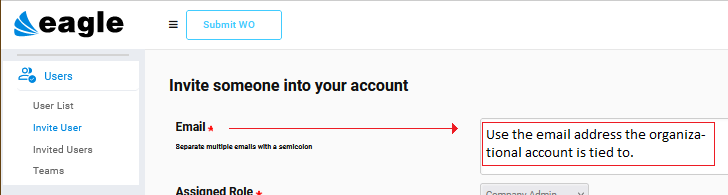
Administrators use the Invite User window to start the process as usual.
Be sure to use the email address the organizational account is tied to.
The key to SSO logins is found on the New User Registration window.
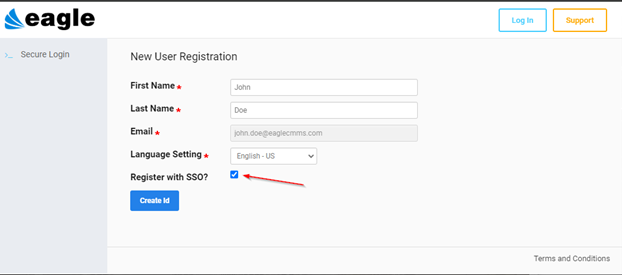
Depending on whether users are currently authenticated with Microsoft, they may be directed to log in to their Microsoft account.
During this first login, authenticated users are to click a link allowing Eagle CMMS to authenticate using their AAD account.
Once completed, they are logged in to Eagle CMMS and can start using the application.
Ongoing SSO Logins
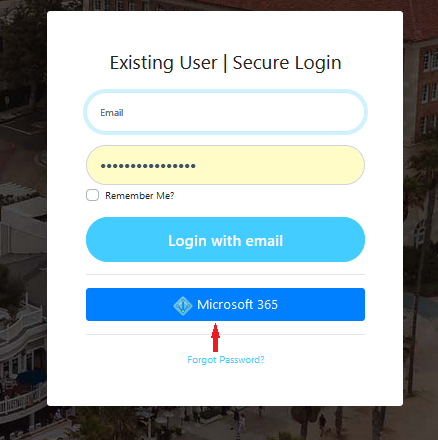
Future logins to Eagle CMMS only require a User to click the Microsoft 365 button on the Eagle CMMS login window.